
Explainer
Infinix GT 50 Pro and JioGames Cloud Gaming Explained: How It Works, What You Need and Cloud vs Native BGMI
Published on
Questions about the GT 50 Pro and cloud gaming?
Last updated: 4 Nov 2026, IST
Quick answer: JioGames Cloud runs games on remote servers and streams them to your screen, so the Infinix GT 50 Pro (or your TV or laptop) acts as the display and controller rather than the console. You don't need a Jio SIM: JioGames says anyone with a stable internet connection can use it. JioGames asks for at least 40 Mbps and recommends 100 Mbps or more, ideally on 5GHz Wi-Fi or 5G. Every new GT 50 Pro box includes a JioGames card for a one-month Pro Pass at ₹1, redeemable until 30 June 2027; renewal terms after the first month still aren't published. For games like BGMI that run natively on the phone, you don't need cloud gaming at all.
The Infinix GT 50 Pro is built around gaming, and Infinix has paired it with JioGames' cloud gaming service. Cloud gaming is new to most buyers in Kashmir, so this guide explains what it is, how JioGames works, what speed you actually need, and where it makes sense next to games you install on the phone. Everything here comes from JioGames' and Infinix's official pages, checked on 28 Oct 2026.
For the phone itself, see our GT 50 Pro price and specs guide and our gaming accessories guide.
What is cloud gaming?
With a normal mobile game, the game is installed on your phone and its chip does all the work. With cloud gaming, the game runs on a powerful computer in a data centre. JioGames describes it this way on its homepage: games run on remote powerful computers and stream to your screen.
Your phone sends your button presses up to the server, and the server sends back the video of the game. That means:
- You can play games your phone couldn't install or run on its own, including console and PC-style titles.
- There's no large download. The game lives on the server.
- Your internet connection becomes the most important part. Any delay or drop in the connection shows up as lag, blur or a pause.
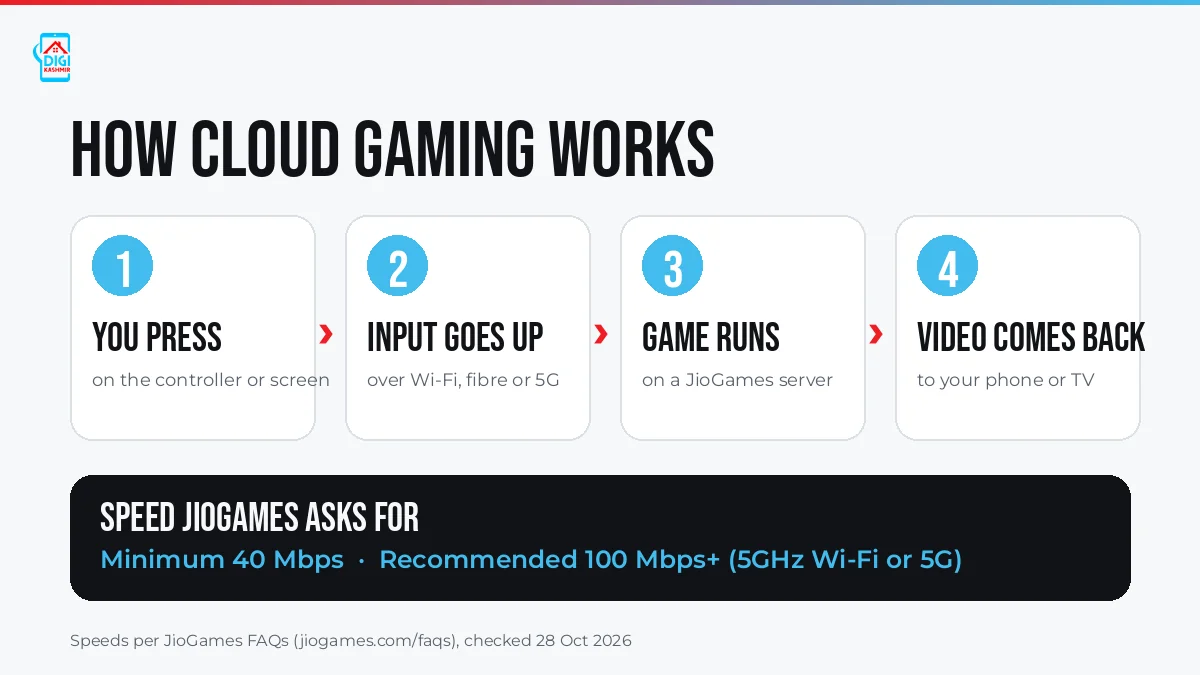
How cloud gaming works. Speeds from the JioGames FAQs, checked 28 Oct 2026. Graphic: Digi Kashmir.
How JioGames cloud gaming works
According to the JioGames FAQs (checked 28 Oct 2026):
- No Jio SIM needed. JioGames says it's optimised for Jio users, but "JioGames Cloud can be accessed by anyone with a stable internet connection". Jio's own help page says smartphone users can log in with any Jio or non-Jio number. (A JioPhone does need a Jio SIM.)
- One account, many screens. One subscription works across your devices, with one user per account.
- Cloud saves. Many games save your progress in the cloud, so you can stop on the phone and pick up on another device. If your connection drops, the session may pause or disconnect, and cloud saves let you resume.
- Subscribing and cancelling. You subscribe in the JioGames app with UPI or through Jio recharge packs, and cancel from your account settings.
How many games? JioGames' own pages differ: its homepage says "1000+ premium cloud games", while its FAQ says "over 500 games". Infinix's offer line says "1,000+ Games". Check the live catalogue in the app for what's actually available.
Which devices and TVs can you play on?
JioGames lists these ways to play (per its FAQs):
| Device | How |
|---|---|
| Android or iPhone (including the GT 50 Pro) | JioGames app. JioGames says the mobile browser works too, but the app gives the best experience. |
| Laptop or desktop | Google Chrome at cloudplay.jiogames.com (Chrome only; turn on hardware acceleration and allow pop-ups) |
| Android TV | JioGames Android TV app |
| Jio Set-Top Box | JioGames on the set-top box |
Playing on a TV with the GT 50 Pro kit: Infinix says the GT NX Station that comes with the GT 50 Pro has an HDMI output up to 4K 60Hz and an Ethernet (RJ45) port up to 100Mbps. If your TV runs Android TV, the simplest route is JioGames' own TV app. We haven't yet tested JioGames played through the GT NX Station's HDMI output, and we'll update this guide once we have.
Controllers: does the GT NX Controller work?
JioGames says it supports wired and wireless controllers on desktop, mobile and TV. Its supported controllers list names these (checked 28 Oct 2026):
- Jio Controller
- EvoFox One S Wireless and EvoFox Elite X2 Wireless
- EvoFox Elite X Wired
- Cosmic Byte Blitz Wireless and Cosmic Byte ARES Wireless
- ZEBRONICS MAX FURY and ZEBRONICS MAX LINK Wireless
The GT NX Controller in the GT 50 Pro box isn't on that list yet. Infinix says it connects over Bluetooth 5.4 with under 20ms latency, splits into two handles, and has a 730mAh battery rated for up to 22 hours. Whether JioGames recognises it as a gamepad is something we haven't tested yet. We'll confirm on a retail unit. Until then, treat it as unconfirmed for JioGames.
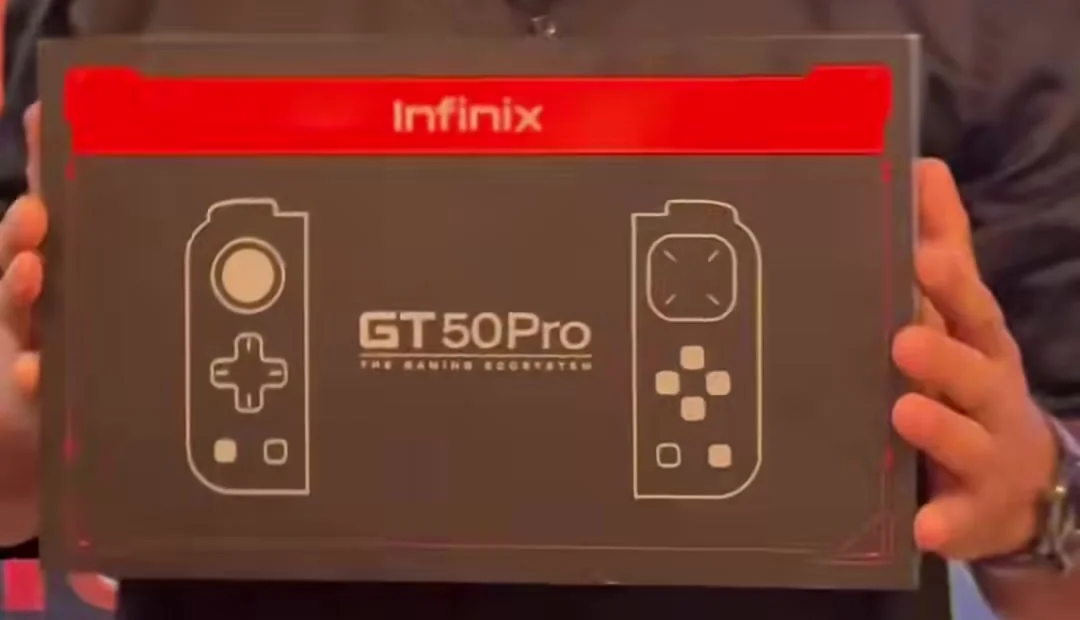
The GT 50 Pro box, with its controller line art. Photo: Digi Kashmir.
What internet speed do you need?
This is the part that decides whether cloud gaming feels great or frustrating. JioGames' FAQ says:
- Minimum: 40 Mbps
- Recommended: 100 Mbps or more, preferably on 5GHz Wi-Fi or 5G
- Lower speeds may cause lag or disconnections. Mobile data works if it's stable and fast enough.
Speed isn't everything. A connection that jumps between fast and slow will feel worse than a steady one at a lower speed, because the game stream has to keep up in real time.
Latency tips for Kashmir
Connections across Srinagar and the rest of the Valley vary a lot by area, building and time of day. To give cloud gaming its best chance:
- Test first. Run a speed test where you'll actually play. TRAI's MySpeed app is one option. If you're well under 40 Mbps, stick to native games for now.
- Use 5GHz Wi-Fi and sit near the router. Thick walls and floors cut Wi-Fi signal quickly.
- Go wired on a TV setup. The GT NX Station has an Ethernet port (up to 100Mbps per Infinix). A cable to the router usually gives a steadier connection than Wi-Fi.
- Keep the network free. Pause big downloads, video streams and backups on other devices while you play.
- Try off-peak hours. Evenings are when home networks and mobile towers are busiest.
- Plan for power cuts. If your router isn't on an inverter or UPS, a power cut ends the session. Cloud saves help you resume, but not mid-match.
- On 5G, check signal first. If your phone keeps switching between 5G and 4G, the stream will stutter. Wi-Fi is usually steadier indoors.
Cloud gaming vs native BGMI on the GT 50 Pro
Cloud gaming and installed games aren't rivals. They're for different things.
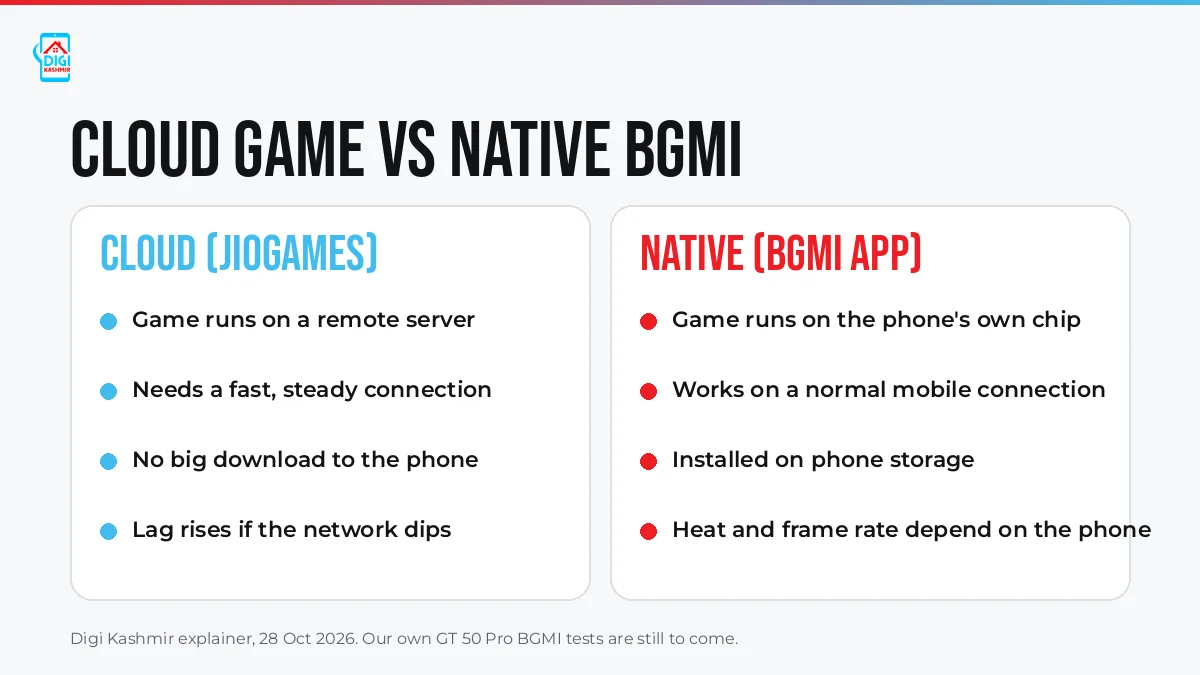
Cloud vs native gaming. Graphic: Digi Kashmir.
| Cloud (JioGames) | Native (BGMI app) | |
|---|---|---|
| Where the game runs | Remote server | The GT 50 Pro's own chip |
| Internet needed | 40 Mbps minimum, 100 Mbps+ recommended (JioGames) | A normal mobile connection for online matches |
| Storage | No large install | Installed on the phone |
| What limits performance | Your connection's speed and stability | The phone's chip, display and cooling |
| Best for | Console and PC-style games, playing on a TV | Competitive mobile shooters like BGMI |
For BGMI, the native app is the way to go on the GT 50 Pro, because the game runs on the phone's own hardware. Infinix advertises "up to 144fps gaming", but BGMI isn't among the games Infinix has certified for 144fps, so BGMI at 144fps is not confirmed. Our own BGMI frame-rate and heat tests are still to come; the price guide has the latest on that. Cloud gaming adds a network round-trip to every shot, which matters most in fast competitive games.
Where JioGames makes sense is the other way round: bigger games that would never run on a phone, played on the GT 50 Pro's screen or on a TV with a controller.
The JioGames Pro Pass offer with the GT 50 Pro
On its official GT 50 Pro page, Infinix's offer line reads: "Unlock 1,000+ Games with JioGames Pro Pass for Just ₹1!" (Infinix's wording, checked 28 Oct 2026).
Infinix's launch press release (27 Oct 2026) says "eligible Infinix GT 50 Pro buyers can access a special JioGames Pro Pass offer of 28 days for just INR 1*". The Pro Pass is the tier that also covers playing on a TV, PC or tablet.
What's in the box: the JioGames Pro Pass card
We opened a GT 50 Pro retail box at our Lal Chowk store on 29 Oct 2026. Inside is a JioGames x Infinix card that reads "1 month PRO PASS at just ₹1", with ₹499 struck through. That's a one-month pass (Infinix's release says 28 days).
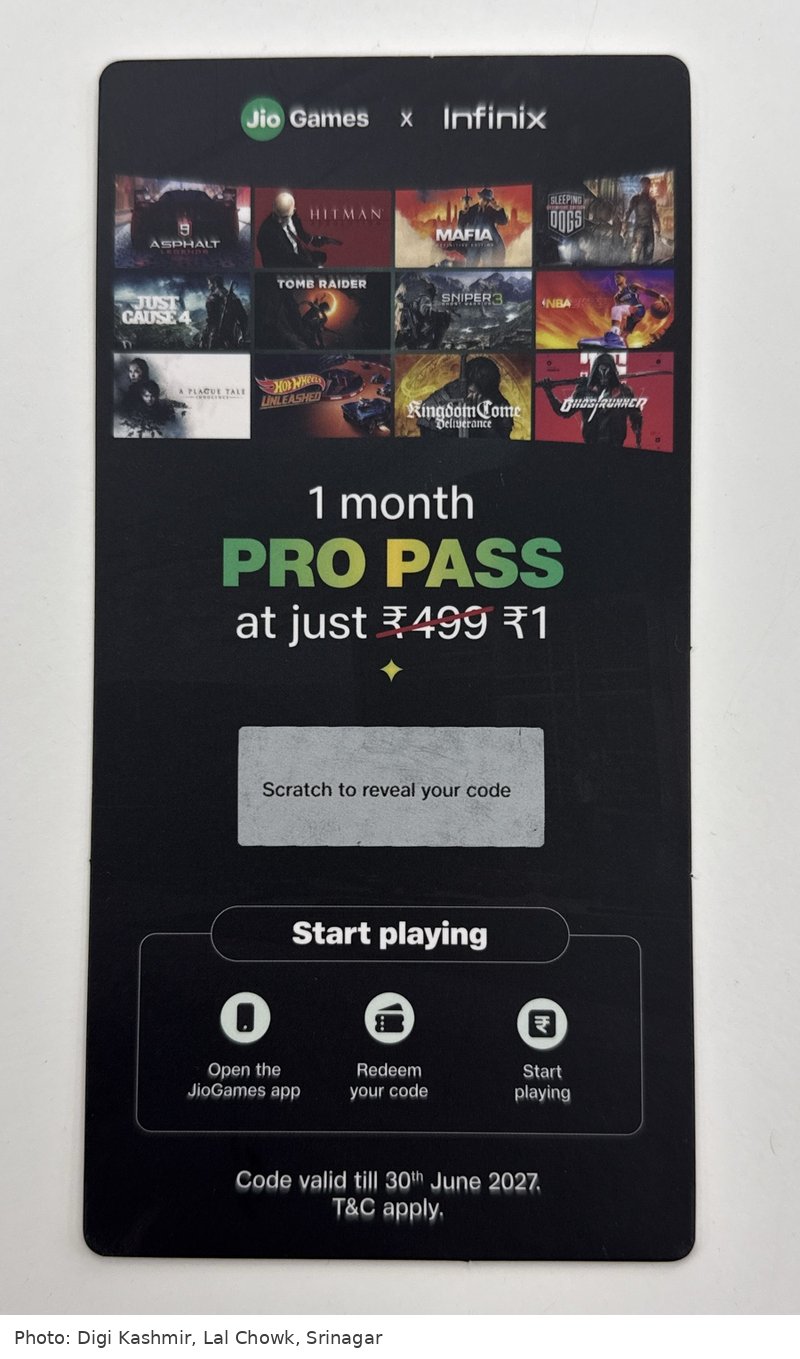
How to redeem it, as printed on the card:
- Scratch the silver panel on the card to reveal your code.
- Open the JioGames app.
- Redeem your code.
- Start playing.
Infinix's launch release also gives a web link for redeeming the offer: cloudplay.jiogames.com/redeem-v2.
Who gets it: the card comes inside the GT 50 Pro retail box, so every buyer who gets a new boxed unit gets a code.
Deadline: the card says "Code valid till 30th June 2027", so you have until then to redeem it.
Games shown on the card include Asphalt, Hitman, Mafia, Sleeping Dogs, Just Cause 4, Tomb Raider, Sniper Ghost Warrior 3, NBA, A Plague Tale, Hot Wheels Unleashed, Kingdom Come: Deliverance and Ghostrunner. These are the titles shown on the card, not a guaranteed library; check the live catalogue in the app.
Still not published (checked 29 Oct 2026): what the pass renews at after the first month, whether a UPI or card autopay is needed, and the full terms (the card only says "T&C apply").
Similar ₹1 JioGames offers on other brands' phones have renewed automatically at the normal price unless you cancel, so check the renewal setting in the JioGames app when you redeem your code. Infinix's release calls ₹499 the Pro Pass's regular price, but JioGames' own homepage (checked 4 Nov 2026) lists the Pro Pass at ₹398 for 28 days, a yearly Pro Pass with a controller included at ₹2,999, and a cheaper Mobile Pass at ₹111 for 56 days. Check the price shown in the app before any renewal.
FAQ
Do I need a Jio SIM to use JioGames on the Infinix GT 50 Pro? No. JioGames says anyone with a stable internet connection can use JioGames Cloud, and Jio's help page says smartphone users can log in with any Jio or non-Jio number. Only JioPhone users need a Jio SIM.
What internet speed does JioGames cloud gaming need? JioGames says a minimum of 40 Mbps, with 100 Mbps or more recommended, preferably on 5GHz Wi-Fi or 5G. Lower speeds may cause lag or disconnections.
Can I play JioGames on my TV? Yes. JioGames has an Android TV app and also runs on the Jio Set-Top Box. On a laptop or desktop, it runs in Google Chrome at cloudplay.jiogames.com.
Does the GT NX Controller work with JioGames? It isn't on JioGames' supported controllers list as of 28 Oct 2026, and we haven't tested it yet. JioGames does support wired and wireless controllers in general. We'll update this answer once we've tried it on a retail unit.
Is cloud gaming good for BGMI? For BGMI, the native app on the GT 50 Pro is the better choice, because the game runs on the phone itself with no extra network delay. Cloud gaming is best for console and PC-style games your phone can't run on its own.
What happens if my internet drops during a cloud game? Per JioGames, the session may pause or disconnect. Many games support cloud saves, so you can resume from your last save.
Can I use one JioGames account on my phone and TV? Yes. JioGames says one subscription works across devices, with one user per account.
How do I redeem the ₹1 JioGames Pro Pass on the GT 50 Pro? The GT 50 Pro retail box has a JioGames x Infinix card. Scratch the panel to reveal your code, open the JioGames app and redeem the code (Infinix's release also gives a web link, cloudplay.jiogames.com/redeem-v2). The card offers a one-month Pro Pass for ₹1 (Infinix's release says 28 days), and the code is valid till 30 June 2027. Renewal terms after the first month haven't been published (the card says "T&C apply"), so check the renewal setting in the app when you redeem.
Final Take
Cloud gaming turns the GT 50 Pro into a window onto games far bigger than any phone can run, as long as your connection keeps up. If you have fast, steady Wi-Fi or fibre at home, JioGames is worth trying, especially on a TV. If your connection is patchy, the GT 50 Pro is still built for native games like BGMI, and that's where it does its best work.
Questions about the GT 50 Pro and cloud gaming?
Sources
- JioGames FAQs (no Jio SIM needed, devices, browser requirements, 40 Mbps minimum and 100 Mbps+ recommended, controllers, accounts, cloud saves, subscribing and cancelling; checked 28 Oct 2026)
- Infinix GT 50 Pro launch press release, as republished by Business News Week (JioGames Pro Pass offer: 28 days for ₹1, regular price ₹499; 27 Oct 2026, checked 29 Oct 2026)
- JioGames homepage (how cloud gaming works, "1000+ premium cloud games"; checked 28 Oct 2026)
- JioGames: supported controllers (checked 28 Oct 2026)
- Jio Help: Do I need a Jio SIM to access JioGames? (checked 28 Oct 2026)
- JioGames homepage (pass prices: Mobile Pass ₹111/56 days, Pro Pass ₹398/28 days, yearly Pro Pass ₹2,999 with controller; checked 4 Nov 2026)
- Infinix India: GT 50 Pro official page (JioGames Pro Pass offer line, "up to 144fps gaming" claim; checked 28 Oct 2026)
- Infinix India: GT NX Controller (Bluetooth 5.4, under 20ms latency, 730mAh, up to 22 hours)
- Infinix India: GT NX Station (HDMI up to 4K 60Hz, RJ45 Ethernet up to 100Mbps)
- Sanchar Saathi FAQ, Department of Telecommunications (mentions TRAI's MySpeed app for testing mobile data speed)
- Infinix global launch press release (PR Newswire) (24 Apr 2026: certified 144fps titles, BGMI not among them)
- The JioGames x Infinix card in the GT 50 Pro retail box, seen by Digi Kashmir, 29 Oct 2026 (1 month Pro Pass at ₹1, ₹499 struck through; redemption steps; code valid till 30 June 2027; T&C apply)
- Graphics and photos: Digi Kashmir.